Robots / ExpertOption
POKZEN FOR EXPERTOPTION
ExpertOption robot.
Your rules, clearly presented.
Explore an ExpertOption workflow with a clear view of the selected rules, risk preferences, and signal review.

Pokzen
Illustrative preview

ExpertOption
Strategy selected
Signal preview
✓ Risk reviewed
Ⅱ Robot paused
Rules in the foreground
Start by reviewing the selected strategy.
Preferences alongside
Keep session limits close to the setup.
A traceable example
Follow the sample signal through its rule check.
See the rule behind the next step.
Explore the ExpertOption workspace with the strategy in focus. Review its settings and follow how a sample signal appears in the activity view.
A platform-focused view
Begin with ExpertOption as the selected workspace.
A clear strategy review
Read the rules alongside the risk preferences.
Context for the signal
See the matched rule and the current review status.
YOUR WORKFLOW
Review the rules. Follow the workflow.
01
Choose ExpertOption
Selected platform
ExpertOption
Demo workspace
Open the ExpertOption workspace and inspect the setup.
02
Review the rules
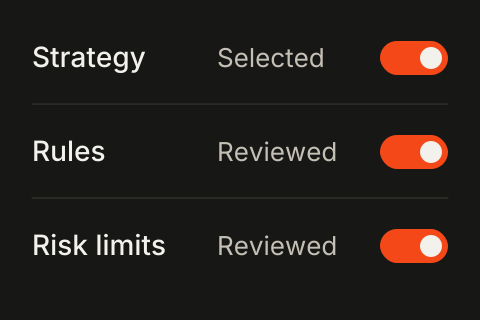
Check the strategy and the risk preferences shown.
03
Check the signal
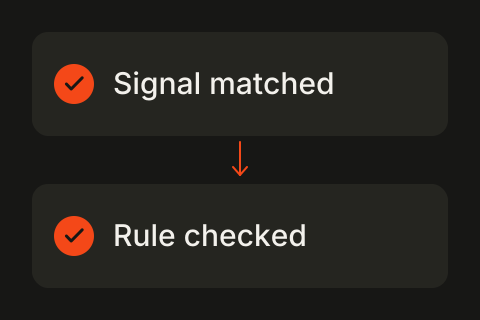
Review the rule matched by the example signal.
04
Follow the review
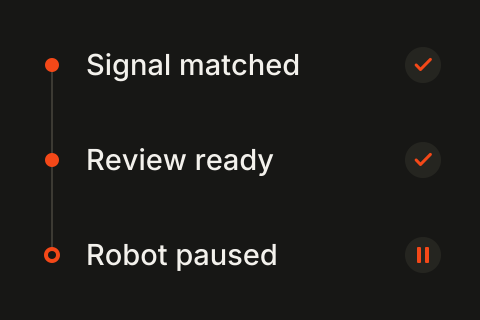
Read the activity entries and the paused session status.
Start with a setup that fits.
Compare the example plans for ExpertOption or a broader collection of robot workflows.
A few things, made clear.
Understand the ExpertOption preview before you explore the workflow.
Make your ExpertOption setup clear.
Explore the selected rules and the activity that puts them in context.

Broker-focused trading automation. Explore robot categories, strategy settings, and activity views in the Pokzen demo.


Robots / ExpertOption
POKZEN FOR EXPERTOPTION
ExpertOption robot.
Your rules, clearly presented.
Explore an ExpertOption workflow with a clear view of the selected rules, risk preferences, and signal review.
Pokzen
Illustrative preview
ExpertOption
Strategy selected
Signal preview
✓ Risk reviewed
Ⅱ Robot paused
Rules in the foreground
Start by reviewing the selected strategy.
Preferences alongside
Keep session limits close to the setup.
A traceable example
Follow the sample signal through its rule check.
See the rule behind the next step.
Explore the ExpertOption workspace with the strategy in focus. Review its settings and follow how a sample signal appears in the activity view.
A platform-focused view
Begin with ExpertOption as the selected workspace.
A clear strategy review
Read the rules alongside the risk preferences.
Context for the signal
See the matched rule and the current review status.
YOUR WORKFLOW
Review the rules. Follow the workflow.
01
Choose ExpertOption
Selected platform
ExpertOption
Demo workspace
Open the ExpertOption workspace and inspect the setup.
02
Review the rules
Check the strategy and the risk preferences shown.
03
Check the signal
Review the rule matched by the example signal.
04
Follow the review
Read the activity entries and the paused session status.
Start with a setup that fits.
Compare the example plans for ExpertOption or a broader collection of robot workflows.
A few things, made clear.
Understand the ExpertOption preview before you explore the workflow.
Make your ExpertOption setup clear.
Explore the selected rules and the activity that puts them in context.
Broker-focused trading automation. Explore robot categories, strategy settings, and activity views in the Pokzen demo.
Robots / ExpertOption
POKZEN FOR EXPERTOPTION
ExpertOption robot.
Your rules, clearly presented.
Explore an ExpertOption workflow with a clear view of the selected rules, risk preferences, and signal review.
Illustrative preview
ExpertOption
Strategy selected
Signal preview
✓ Risk reviewed
Ⅱ Robot paused
Rules in the foreground
Start by reviewing the selected strategy.
Preferences alongside
Keep session limits close to the setup.
A traceable example
Follow the sample signal through its rule check.
See the rule behind the next step.
Explore the ExpertOption workspace with the strategy in focus. Review its settings and follow how a sample signal appears in the activity view.
A platform-focused view
Begin with ExpertOption as the selected workspace.
A clear strategy review
Read the rules alongside the risk preferences.
Context for the signal
See the matched rule and the current review status.
YOUR WORKFLOW
Review the rules. Follow the workflow.
01
Choose ExpertOption
Selected platform
ExpertOption
Demo workspace
Open the ExpertOption workspace and inspect the setup.
02
Review the rules
Check the strategy and the risk preferences shown.
03
Check the signal
Review the rule matched by the example signal.
04
Follow the review
Read the activity entries and the paused session status.
Start with a setup that fits.
Compare the example plans for ExpertOption or a broader collection of robot workflows.
A few things, made clear.
Understand the ExpertOption preview before you explore the workflow.
Make your ExpertOption setup clear.
Explore the selected rules and the activity that puts them in context.
Broker-focused trading automation. Explore robot categories, strategy settings, and activity views in the Pokzen demo.